

🚀 Master Java database connectivity, JDBC, and MySQL stored procedures!
🔔 Subscribe to Ram N Java on YouTubeWhat Is CallableStatement in JDBC?
The CallableStatement interface in JDBC allows Java applications to execute stored procedures and functions defined directly in relational databases like MySQL.
Stored procedures can accept input values (IN parameters) to filter or process records and return computed values (OUT parameters) back to the caller. With CallableStatement, you can bind input values, register output types, and retrieve individual output variables cleanly without having to parse an entire table row.
The MySQL Stored Procedure (get_city_name)
Below is the stored procedure created in the MySQL world database. It takes a City ID as an IN parameter and retrieves the matching city name into an OUT parameter:
DELIMITER $$

CREATE PROCEDURE `get_city_name`(
    IN  city_id   INT,
    OUT city_name VARCHAR(35)
)
BEGIN
    SELECT Name
    INTO city_name
    FROM city
    WHERE ID = city_id;
END$$

DELIMITER ;
Complete Java Source Code Example
The following Java program connects to MySQL, accepts a City ID from the user console using Scanner, sets the input parameter, registers the output parameter using Types.VARCHAR, and prints the result:
package com.ram.jdbc;

import java.sql.CallableStatement;
import java.sql.Connection;
import java.sql.DriverManager;
import java.sql.SQLException;
import java.sql.Types;
import java.util.Scanner;

public class JDBCCallableStatementDemo {

    static final String JDBC_DRIVER = "com.mysql.jdbc.Driver";
    static final String DB_URL = "jdbc:mysql://localhost:3306/world";
    static final String USER = "root";
    static final String PASS = "root";

    public static void main(String[] args) {
        JDBCCallableStatementDemo demo = new JDBCCallableStatementDemo();
        Scanner scanner = new Scanner(System.in);

        System.out.print("Enter City ID (e.g., 1, 5000, 5001 or 0 to exit): ");
        int cityId = scanner.nextInt();

        while (cityId > 0) {
            demo.getCityName(cityId);

            System.out.print("\nEnter City ID or 0 to exit: ");
            cityId = scanner.nextInt();
        }
        scanner.close();
    }

    public void getCityName(int cityId) {
        Connection conn = null;
        CallableStatement cstmt = null;

        try {
            // Step 1: Register MySQL JDBC Driver
            Class.forName(JDBC_DRIVER);

            // Step 2: Establish database connection
            conn = DriverManager.getConnection(DB_URL, USER, PASS);

            // Step 3: Prepare the procedure call with escape syntax
            String sql = "{call get_city_name(?, ?)}";
            cstmt = conn.prepareCall(sql);

            // Step 4: Set IN parameter (City ID)
            cstmt.setInt(1, cityId);

            // Step 5: Register OUT parameter type (VARCHAR)
            cstmt.registerOutParameter(2, Types.VARCHAR);

            // Step 6: Execute the stored procedure
            cstmt.execute();

            // Step 7: Retrieve OUT parameter value
            String cityName = cstmt.getString(2);
            System.out.println("City Name: " + cityName);

        } catch (ClassNotFoundException | SQLException e) {
            e.printStackTrace();
        } finally {
            // Step 8: Clean up database resources
            try {
                if (cstmt != null) cstmt.close();
                if (conn != null) conn.close();
            } catch (SQLException se) {
                se.printStackTrace();
            }
        }
    }
}
Key Steps to Follow
-
Call Syntax: Use the standard SQL escape syntax
"{call get_city_name(?, ?)}"where the first placeholder is theINparameter and the second is theOUTparameter. -
Set Input Value: Bind values to input placeholders using standard setter methods like
setInt(1, cityId). -
Register Output Types: Call
registerOutParameter(2, Types.VARCHAR)before executing the procedure. -
Retrieve Output Value: Use getter methods matching the registered type, such as
getString(2), after callingexecute(). -
Resource Cleanup: Always close the
CallableStatementandConnectionin thefinallyblock.
Related Tutorials You Might Enjoy
Click here to watch in Youtube : https://www.youtube.com/watch?v=jrTKujzil-w&index=1&list=UUhwKlOVR041tngjerWxVccw
Click the below Image to Enlarge
 |
| JDBC - CallableStatement with Input and Output Parameters(Mysql) |
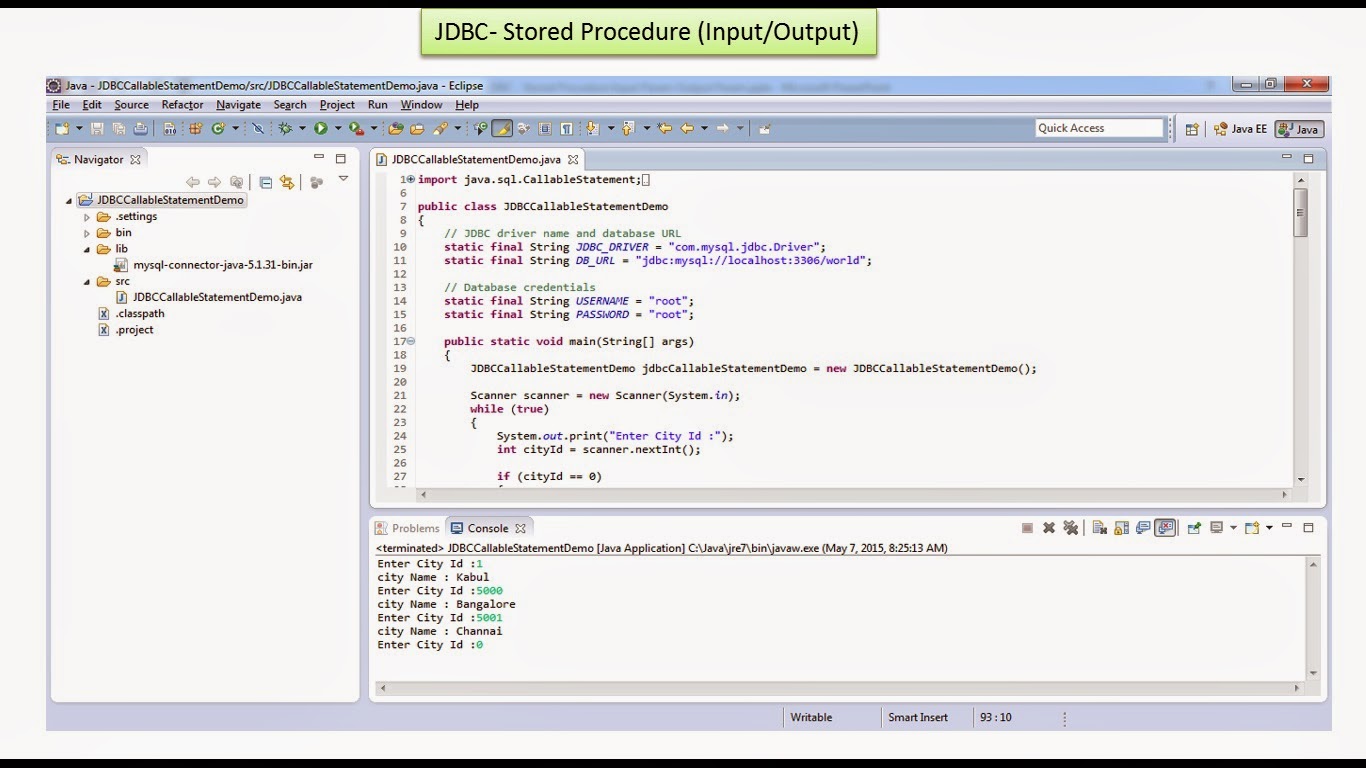 |
| JDBC - CallableStatement with Input and Output Parameters(Mysql) |

get mobile application and website application with well tested
ReplyDeleteYou are doing a good job and sharing your knowledge to others! it was one of the good post to read and useful to improve the knowledge as updated one, keep doing the good work.
ReplyDeleteSpring Boot Training in Electronic City Bangalore
Spring Boot Course in Electronic City Bangalore
Spring Boot Training Institutes in Electronic City Bangalore
Great insights! It was great to see you break down this topic in such detail.
ReplyDeleteSpring Boot Certification Training Course In Electronic City Bangalore