

Click here to watch in Youtube :
https://www.youtube.com/watch?v=USBG4oiFvuo&list=PLmCsXDGbJHdhyX_ZywkAJYigVJwRJmu3Z

Subscribe to Ram N Java for clean, beginner-friendly core Java tutorials and interview prep!
🔔 Subscribe to Ram N Java
In Java, serialization is the process of converting an object's state into a binary stream of bytes so it can be saved to a file, persisted into a database, or transmitted across a network. The fundamental class that makes this possible is ObjectOutputStream from the java.io package.
ObjectOutputStream is a processing stream that wraps around an existing low-level byte output stream, such as a FileOutputStream. It implements both the ObjectOutput and DataOutput interfaces, allowing it to write full Java objects as well as raw primitive data types directly into the byte stream.
writeObject(Object obj): The primary method used to serialize an object. It writes the class descriptor, class signature, and the non-transient, non-static field values into the destination stream.
DataOutput like writeInt(int val), writeDouble(double val), writeBoolean(boolean val), and writeUTF(String str).
flush() and close(): Flushes buffered output bytes and releases underlying OS resources.
1. Must Implement Serializable: Any object passed into writeObject() must implement either java.io.Serializable or java.io.Externalizable. If it does not, the JVM throws a runtime NotSerializableException.
2. Static and Transient Fields: By default, ObjectOutputStream skips any field marked with transient or static, ensuring only instance state is persisted.
3. Handling Object Graphs: If the serialized object contains references to other objects, ObjectOutputStream serializes the complete graph of reachable objects automatically.

 |
| Java Tutorial : Java IO (Java Serializable Interface) |
import java.io.Serializable;

public class Employee implements Serializable
{
    private static final long serialVersionUID = 3558283530338723147L;
    private int id;
    private String name;

    public int getId()
    {
        return id;
    }

    public void setId(int id)
    {
        this.id = id;
    }

    public String getName()
    {
        return name;
    }

    public void setName(String name)
    {
        this.name = name;
    }

}
Refer:
Subscribe to Ram N Java for clean, beginner-friendly core Java tutorials and interview prep!
🔔 Subscribe to Ram N JavaIn Java, Serialization is the process of converting the state of an object into a sequence of bytes. This byte stream can then be persisted into a file, stored in a database, or transmitted across a network to another JVM.
The reverse process—recreating the actual Java object from that byte stream in memory—is called Deserialization.
Java provides built-in support for object persistence in the java.io package through several key components:
Serializable Interface: A marker interface (it has no methods or fields). A class must implement this interface to signal to the JVM that its instances can be safely serialized.
ObjectOutputStream: A high-level processing stream that converts Java objects into byte streams using its writeObject() method.
ObjectInputStream: Reads the raw byte stream and reconstructs the original object in memory using its readObject() method.
transient Fields: Fields marked with the transient keyword are excluded from serialization and receive default values upon deserialization.static Fields: Static variables belong to the class rather than an individual instance, so they are never saved in the serialized byte stream.serialVersionUID: A unique identifier that ensures class compatibility between the sender and receiver during deserialization. |
| Java Tutorial : Java IO (Java Serialization_V5) |
 |
| Java Tutorial : Java IO (Java Serialization_V5) |
Subscribe to Ram N Java for clean, beginner-friendly core Java tutorials and interview prep!
🔔 Subscribe to Ram N JavaSerialization is one of the most essential building blocks of the Java IO framework. Whether you want to persist application state across restarts or transmit live objects over a network connection, getting started with serialization allows you to convert any supported Java object into a portable stream of bytes.
Your class must implement java.io.Serializable. This is a marker interface with no abstract methods to implement, acting purely as an opt-in signal to the Java Virtual Machine.
public class Student implements java.io.Serializable {
    private static final long serialVersionUID = 1L;
    private int id;
    private String name;

    public Student(int id, String name) {
        this.id = id;
        this.name = name;
    }
}
Use FileOutputStream wrapped inside an ObjectOutputStream to write the instance state to disk:
try (FileOutputStream fos = new FileOutputStream("student.ser");
     ObjectOutputStream oos = new ObjectOutputStream(fos)) {

    Student student = new Student(101, "Ram");
    oos.writeObject(student);
    System.out.println("Object serialized successfully!");
} catch (IOException e) {
    e.printStackTrace();
}
To recreate the object instance in memory, wrap a FileInputStream with an ObjectInputStream and cast the returned object:
try (FileInputStream fis = new FileInputStream("student.ser");
     ObjectInputStream ois = new ObjectInputStream(fis)) {

    Student student = (Student) ois.readObject();
    System.out.println("Deserialized student: " + student);
} catch (IOException | ClassNotFoundException e) {
    e.printStackTrace();
}serialVersionUID to avoid class version mismatch errors during deserialization.transient to omit sensitive values like passwords or tokens from the output byte stream. |
| Java Tutorial : Java IO (Java Serialization_V4) |
 |
| Java Tutorial : Java IO (Java Serialization_V4) |
 |
| Java Tutorial : Java IO (Java Serialization_V4) |
 |
| Java Tutorial : Java IO (Java Serialization_V4) |
Subscribe to Ram N Java for clean, beginner-friendly core Java tutorials and interview prep!
🔔 Subscribe to Ram N JavaIn Java, objects exist in heap memory as long as the JVM is running. But what happens when you need to store an object’s current state to a file, persist it into a database, or transfer it across the network to another system? This is where Java Serialization comes into play.
A class must implement the java.io.Serializable marker interface to become serializable. Because it contains no methods or variables, it simply marks the class as eligible for conversion to a byte stream.
The standard stream classes responsible for serialization and deserialization:
ObjectOutputStream.writeObject() writes the object state to an output stream.ObjectInputStream.readObject() reconstructs the object from an input stream.transient: Prevents specific instance fields from being serialized (restored to default values like null or 0).static: Belongs to the class level rather than the instance, meaning static variables are not part of the serialized state. |
| Java Tutorial : Java IO (Java Serialization_V3) |
 |
| Java Tutorial : Java IO (Java Serialization_V3) |
 |
| Java Tutorial : Java IO (Java Serialization_V3) |
 |
| Java Tutorial : Java IO (Java Serialization_V3) |
Subscribe to Ram N Java for clean, beginner-friendly core Java tutorials and interview prep!
🔔 Subscribe to Ram N JavaIn object-oriented programming with Java, applications constantly create objects that reside in memory. However, when the program terminates, all those objects are lost. Java Serialization is the core mechanism that allows developers to save the state of an object into a portable byte stream, enabling long-term persistence and seamless data transfer across networks.
ObjectOutputStream.
ObjectInputStream.
java.io.Serializable, a marker interface that contains no methods or fields.
| Concept | Behavior |
|---|---|
transient Fields |
Excluded from serialization; restored to default values (e.g., null, 0) |
static Fields |
Belong to the class definition rather than the object instance; never serialized |
serialVersionUID |
Ensures class compatibility during deserialization across different JVM versions |
 |
| Java Tutorial : Java IO (Java Serialization_V2) |
 |
| Java Tutorial : Java IO (Java Serialization_V2) |
Subscribe to Ram N Java for clean, beginner-friendly core Java tutorials and interview prep!
🔔 Subscribe to Ram N JavaSerialization is one of the core foundational features of Java IO. It provides a standard, platform-independent mechanism for converting the state of an object into a byte stream. This byte stream can be written to a file, stored in a database, or transmitted across network connections, making it vital for enterprise applications and distributed systems.
The serialization architecture in Java revolves around two complementary processes:
ObjectOutputStream.writeObject().
ObjectInputStream.readObject().
Classes must explicitly opt in to serialization by implementing java.io.Serializable. Because it contains no methods or variables, it acts as a marker interface that instructs the JVM runtime that objects of this class are safe to serialize.
transient: Prevents sensitive or temporary fields from being serialized. These fields will be initialized to their default values (e.g., null, 0) upon deserialization.static: Belongs to the class rather than an object instance, meaning static variables are never saved into the serialized stream.
The serialVersionUID constant is used to verify that the sender and receiver of a serialized object have loaded classes that are compatible with respect to serialization.
| Component | Description |
|---|---|
Serializable |
Marker interface required for classes to be serializable |
ObjectOutputStream |
Writes object state to a byte stream via writeObject() |
ObjectInputStream |
Reconstructs objects from a byte stream via readObject() |
transient |
Omits fields from serialization |
 |
| Java Tutorial : Java IO (Java Serialization_V1) |
 |
| Java Tutorial : Java IO (Java Serialization_V1) |


 |
| Java Tutorial : Java IO (Marker Interface) |

 |
| Java Tutorial : Java IO (DataStreams) |

import java.io.DataOutputStream;
import java.io.FileOutputStream;
import java.io.IOException;

public class DataOutputStreamDemo
{

    public static void main(String[] args) throws Exception
    {
        DataOutputStreamDemo dataOutputStreamDemo = new DataOutputStreamDemo();
        dataOutputStreamDemo.writePrimitiveData();
    }

    public void writePrimitiveData() throws IOException
    {
        DataOutputStream dataOutputStream = null;
        FileOutputStream fileOutputStream = null;
        try
        {
            fileOutputStream = new FileOutputStream("data.txt");
            dataOutputStream = new DataOutputStream(fileOutputStream);
            int[] intArray = { 100, 250, 440, 550, 900 };

            for (int j : intArray)
            {
                dataOutputStream.writeInt(j);
            }

            System.out.println("Successfully written to \'data.txt\' file\n");
        }
        finally
        {
            if (dataOutputStream != null)
            {
                /*
                 * Closing a DataOutputStream will also
                 * close the OutputStream instance to which
                 * the DataOutputStream is writing.
                 */
                dataOutputStream.close();
            }
        }

    }
}
Successfully written to 'data.txt' file
data.txt
import java.io.DataInputStream;
import java.io.FileInputStream;
import java.io.IOException;

public class DataInputStreamDemo
{

    public static void main(String[] args) throws Exception
    {
        DataInputStreamDemo dataInputStreamDemo = new DataInputStreamDemo();
        dataInputStreamDemo.readPrimitiveData();
    }

    public void readPrimitiveData() throws IOException
    {
        FileInputStream fileInputStream = null;
        DataInputStream dataInputStream = null;

        try
        {
            fileInputStream = new FileInputStream("data.txt");
            dataInputStream = new DataInputStream(fileInputStream);

            while (dataInputStream.available() > 0)
            {
                int intValue = dataInputStream.readInt();
                System.out.println(intValue);
            }

        }
        finally
        {
            if (dataInputStream != null)
            {
                /*
                 * Closing a DataInputStream will also close
                 * the InputStream instance from which the
                 * DataInputStream is reading.
                 */
                dataInputStream.close();
            }
        }

    }

}
100
250
440
550
900


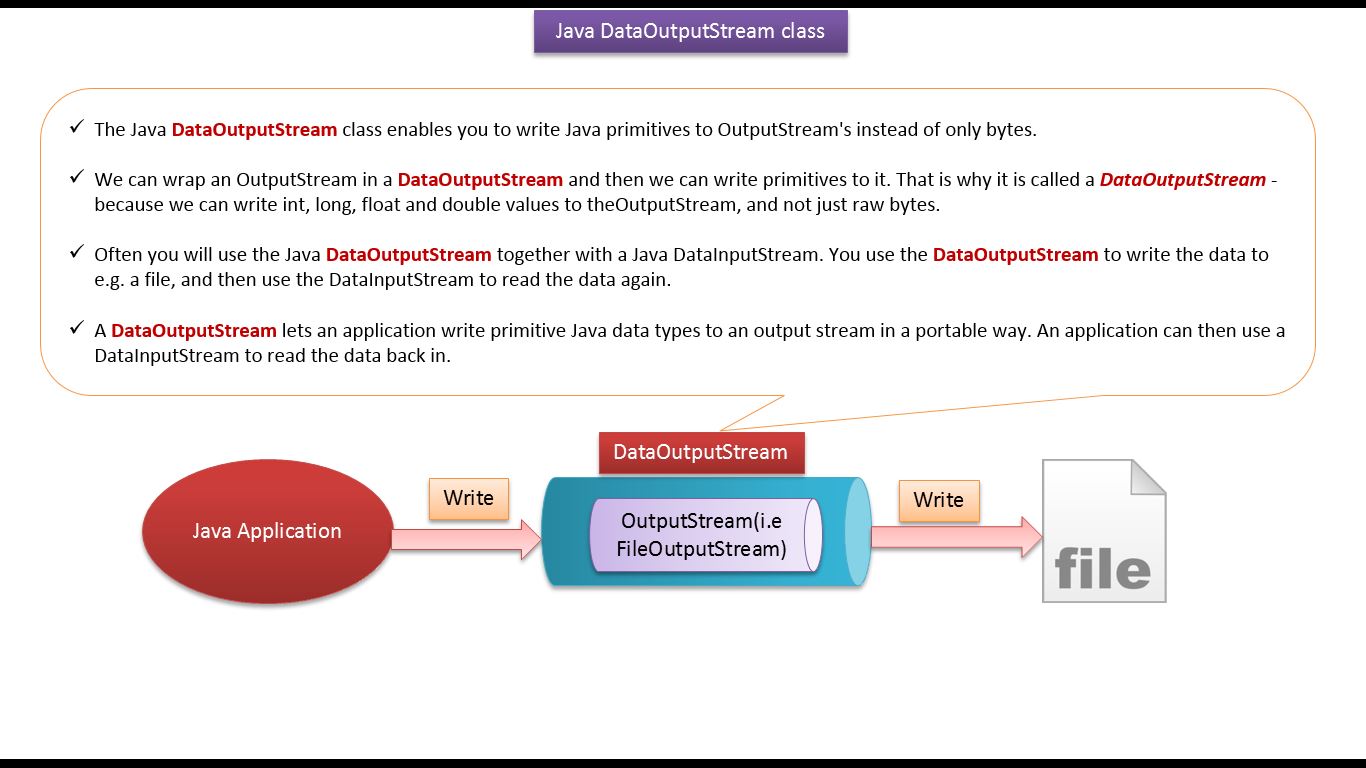 |
| Java Tutorial : Java IO (DataOutputStream) |
 |
| Java Tutorial : Java IO (DataOutputStream) |
 |
| Java Tutorial : Java IO (DataOutputStream) |
 |
| Java Tutorial : Java IO (DataOutputStream) |
 |
| Java Tutorial : Java IO (DataOutputStream) |
import java.io.DataOutputStream;
import java.io.FileOutputStream;
import java.io.IOException;

public class DataOutputStreamDemo
{

    public static void main(String[] args) throws Exception
    {
        DataOutputStreamDemo dataOutputStreamDemo = new DataOutputStreamDemo();
        dataOutputStreamDemo.writePrimitiveData();
    }

    public void writePrimitiveData() throws IOException
    {
        DataOutputStream dataOutputStream = null;
        FileOutputStream fileOutputStream = null;
        try
        {
            fileOutputStream = new FileOutputStream("data.bin");
            dataOutputStream = new DataOutputStream(fileOutputStream);

            dataOutputStream.writeInt(125);
            dataOutputStream.writeFloat(150.45F);
            dataOutputStream.writeLong(9090);
            dataOutputStream.writeBoolean(true);

            System.out.println("Successfully written primitive data's to \'data.bin\' file\n");
        }
        finally
        {
            if (dataOutputStream != null)
            {
                /*
                 * Closing a DataOutputStream will also
                 * close the OutputStream instance to which
                 * the DataOutputStream is writing.
                 */
                dataOutputStream.close();
            }
        }

    }
}
Output
Successfully written primitive data's to 'data.bin' file

import java.io.DataInputStream; import java.io.FileInputStream; import java.io.IOException; public class DataInputStreamDemo { public static void main(String[] args) throws Exception { DataInputStreamDemo dataInputStreamDemo = new DataInputStreamDemo(); dataInputStreamDemo.readPrimitiveData(); } public void readPrimitiveData() throws IOException { FileInputStream fileInputStream = null; DataInputStream dataInputStream = null; try { fileInputStream = new FileInputStream("data.bin"); dataInputStream = new DataInputStream(fileInputStream); int intValue = dataInputStream.readInt(); float floatValue = dataInputStream.readFloat(); long longValue = dataInputStream.readLong(); boolean booleanValue = dataInputStream.readBoolean(); System.out.println("intValue = " + intValue); System.out.println("floatValue = " + floatValue); System.out.println("longValue = " + longValue); System.out.println("booleanValue = " + booleanValue); } finally { if (dataInputStream != null) { /* * Closing a DataInputStream will also close * the InputStream instance from which the * DataInputStream is reading. */ dataInputStream.close(); } } } } OutputRefer:intValue = 125 floatValue = 150.45 longValue = 9090 booleanValue = true
