Showing posts with label Java for Beginners. Show all posts

Saturday, 24 February 2024

Spring Boot Explained: A Layman's Magical House Kit Analogy

🍃 Simplify Your Coding Journey!

Tech doesn't have to be complicated. Subscribe to Ram N Java for more analogies and guides that make sense!

SUBSCRIBE FOR FREE

Spring Boot: The "Magical House Kit" of Tech

Ever feel overwhelmed when someone tries to explain Spring Boot? You're not alone. In this tutorial, we strip away the technical jargon and use a simple, "Magical House Kit" analogy to explain what Spring Boot actually is and why it’s a game-changer for developers around the world.

The Traditional Way vs. The Spring Boot Way

Imagine you want to build a house:

  • The Old Way (Spring): You have to source every brick, mix the cement yourself, and find a plumber and electrician separately. It works, but it takes forever to set up.
  • The Spring Boot Way: You get a "Magical House Kit." The walls are pre-built, the plumbing is already inside, and it even comes with its own power generator (Embedded Server). You just decide where the furniture goes!

Why is it so Powerful?

By providing sensible defaults and "auto-configuration," Spring Boot does the boring setup work for you. Here is why developers love it:

  • Auto-Configuration: It guesses what you need based on the tools you've added.
  • Embedded Servers: No need to set up an external web server like Tomcat; it’s already inside the kit.
  • Ready for Production: It comes with built-in health checks and metrics.

Build Faster, Build Better

Spring Boot allows you to stop worrying about the "plumbing" of your application and focus on what matters most: the features that help your users. Whether you're a beginner or a pro, understanding this "Magical House Kit" approach is the key to mastering modern Java development. Happy coding!


Continue Learning with Ram N Java:

Thursday, 13 August 2015

Java Tutorial : Inheritance in Java Example

Enjoying This Tutorial?

Subscribe to Ram N Java for more easy, step-by-step Java tutorials!

Subscribe on YouTube

What is Inheritance in Java?

Inheritance is one of the core Object-Oriented Programming (OOP) concepts in Java. It allows one class to inherit properties (fields) and behaviors (methods) from another class.

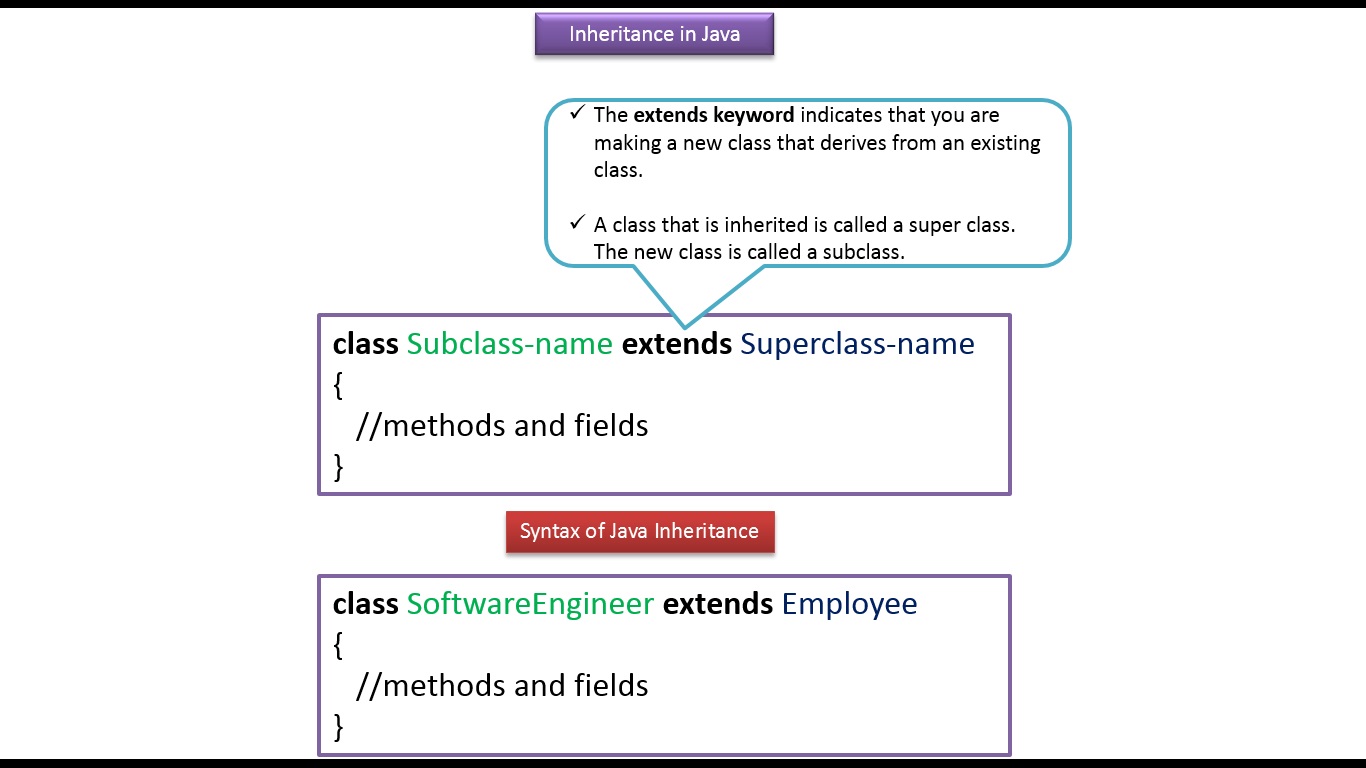
By using the extends keyword, you establish an "IS-A" relationship between classes. This promotes clean architecture and code reusability.

Superclass vs. Subclass

  • Superclass (Parent Class): The class whose features are inherited. In our example, Employee is the superclass.
  • Subclass (Child Class): The class that inherits features from the superclass. In our example, SoftwareEngineer is the subclass.

Practical Example: Employee & SoftwareEngineer

A SoftwareEngineer is an Employee. Because SoftwareEngineer extends Employee, an instance of SoftwareEngineer can directly access the parent class properties like salary and methods like run() and walk(), along with its own unique property bonus and method talkAboutJava().

Key Takeaways

  • Use the extends keyword to implement inheritance in Java.
  • Child classes automatically acquire accessible fields and methods from the parent class.
  • Inheritance eliminates code redundancy and improves maintainability.

Recommended Tutorials from Ram N Java


Click here to watch in Youtube : 
https://www.youtube.com/watch?v=x8y_2Gkn-N8&list=UUhwKlOVR041tngjerWxVccw

Click the below Image to Enlarge

Employee.java
/**
 * Employee class is the Super class.
 */
public class Employee
{
    int salary = 50000;

    public void run()
    {
        System.out.println("Can run");
    }

    public void walk()
    {
        System.out.println("Can Walk");
    }

}
SoftwareEngineer.java
/**
 * SoftwareEngineer class is the sub class which
 * extends Employee Super class.
 */
public class SoftwareEngineer extends Employee
{
    int bonus = 30000;
    
    public void talkAboutJava()
    {
        System.out.println("Can talk about Java");
    }
}
InheritanceExample.java
public class InheritanceExample
{
    public static void main(String[] args)
    {
        SoftwareEngineer softwareEngineer = new SoftwareEngineer();

        /*
         * SoftwareEngineer object can access the field and methods of own class
         * as well as of Employee class i.e. code reusability.
         */

        System.out.println("Properties");
        System.out.println("-----------------");
        System.out.println("SoftwareEngineer salary is:"
                + softwareEngineer.salary);

        System.out.println("Bonus of SoftwareEngineer is:"
                + softwareEngineer.bonus);

        System.out.println("\nBehaviours");
        System.out.println("-----------------");
        softwareEngineer.run();
        softwareEngineer.walk();
        softwareEngineer.talkAboutJava();

    }

}
Output
Properties
-----------------
SoftwareEngineer salary is:50000
Bonus of SoftwareEngineer is:30000

Behaviours
-----------------
Can run
Can Walk
Can talk about Java
To Download InheritanceDemoExampleApp Project Click the below link
https://sites.google.com/site/javaee4321/java/InheritanceDemoExampleApp.zip?attredirects=0&d=1

See also:

  • All JavaEE Viedos Playlist
  • All JavaEE Viedos
  • All JAVA EE Links
  • Servlets Tutorial
  • All Design Patterns Links
  • JDBC Tutorial
  • Java Collection Framework Tutorial
  • JAVA Tutorial
  • Java Tutorial : Inheritance in Java

    Enjoying This Java Lesson?

    Subscribe to Ram N Java for more easy, beginner-friendly programming tutorials!

    Subscribe on YouTube

    What is Inheritance in Java?

    Inheritance in Java is a core Object-Oriented Programming (OOP) mechanism where one object acquires all the properties (fields) and behaviors (methods) of a parent object.

    It represents the IS-A relationship (also known as a Parent-Child relationship). With inheritance, you can create new classes built upon existing ones, allowing you to reuse fields and methods while adding new ones to the child class.

    Why Do We Need Inheritance?

    • Code Reusability: Avoid writing duplicate code by reusing fields and methods from existing classes.
    • Method Overriding & Runtime Polymorphism: Easily customize inherited behavior to achieve runtime polymorphism.

    Syntax & Real-World Example

    To inherit from a class in Java, use the extends keyword:

    class SoftwareEngineer extends Employee {
      // SoftwareEngineer inherits salary, run(), walk()
      // Plus adds bonus and talkAboutJava()
    }

    In this example:

    • Employee is the Superclass (Parent Class).
    • SoftwareEngineer is the Subclass (Child Class) that inherits all properties and methods from Employee.

    Recommended Tutorials from Ram N Java


    Click here to watch in Youtube :
    https://www.youtube.com/watch?v=oRLUFOr8sak&list=UUhwKlOVR041tngjerWxVccw

    Click the below Image to Enlarge
    Java Tutorial : Inheritance in Java 
    Java Tutorial : Inheritance in Java 
    Java Tutorial : Inheritance in Java 
    See also:
  • All JavaEE Viedos Playlist
  • All JavaEE Viedos
  • All JAVA EE Links
  • Servlets Tutorial
  • All Design Patterns Links
  • JDBC Tutorial
  • Java Collection Framework Tutorial
  • JAVA Tutorial
  • Tutorials