Friday, 6 April 2018

How to create spring hello world project using maven | Spring Tutorial | Spring basics

🚀 Master Spring & Java with Ram N Java!

Want to become a Pro Developer? Join our community today for crystal-clear coding tutorials!

SUBSCRIBE NOW (IT'S FREE!)

Building Your First Spring Maven Project

Starting your journey with the Spring Framework? The best way to begin is by creating a simple "Hello World" application. In this guide, we use Maven to handle all our dependencies, making the setup professional and efficient!

1. Why Use Maven for Spring?

Maven is a powerful build tool. Instead of manually downloading JAR files, you simply list what you need in a pom.xml file. Maven then automatically downloads and manages everything for you. It's the industry standard for Java development!

2. Setting Up the POM.xml

The core of your project is the pom.xml. To get Spring running, you need to add the spring-context dependency. This gives you access to the Spring IoC container, which will manage your "Hello World" bean.

3. Creating Your First Bean

In Spring, a "Bean" is just a simple Java object managed by the framework. We create a class with a simple method like sayHello(). We then tell Spring about this bean using an XML configuration file or Java annotations.

4. Running the Application

To see the magic happen, we use ApplicationContext to load our configuration. When we ask the context for our bean and call the method, Spring delivers the object perfectly initialized. Congratulations, you've just run your first Spring app!


Click here to watch on Youtube:
https://www.youtube.com/watch?v=AnIXL0YXszA&list=UUhwKlOVR041tngjerWxVccw

Click the below Image to Enlarge:
How to create spring hello world project using maven | Spring Tutorial | Spring basics

How to create spring hello world project using maven | Spring Tutorial | Spring basics

How to create spring hello world project using maven | Spring Tutorial | Spring basics

How to create spring hello world project using maven | Spring Tutorial | Spring basics

How to create spring hello world project using maven | Spring Tutorial | Spring basics

How to create spring hello world project using maven | Spring Tutorial | Spring basics

How to create spring hello world project using maven | Spring Tutorial | Spring basics

How to create spring hello world project using maven | Spring Tutorial | Spring basics

How to create spring hello world project using maven | Spring Tutorial | Spring basics

How to create spring hello world project using maven | Spring Tutorial | Spring basics

How to create spring hello world project using maven | Spring Tutorial | Spring basics

How to create spring hello world project using maven | Spring Tutorial | Spring basics

How to create spring hello world project using maven | Spring Tutorial | Spring basics

How to create spring hello world project using maven | Spring Tutorial | Spring basics

Maven Commands and Spring 5 dependencies.txt


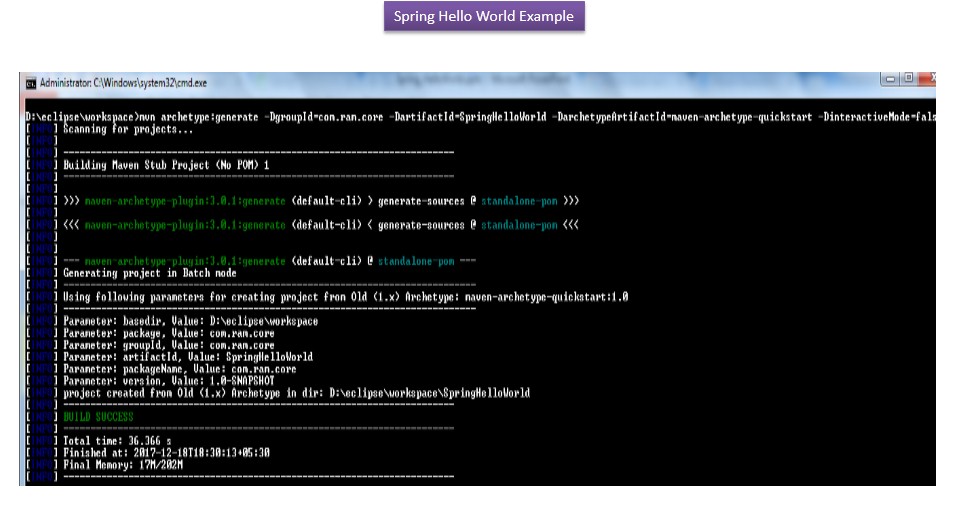
Generate project structure with Maven:

mvn archetype:generate -DgroupId=com.ram.core -DartifactId=SpringHelloWorld -DarchetypeArtifactId=maven-archetype-quickstart -DinteractiveMode=false


Convert to Eclipse project:

mvn eclipse:eclipse

Compile:

mvn clean compile


Spring 5 dependencies:

<properties>
    <spring.version>5.0.2.RELEASE</spring.version>
</properties>


<!-- Spring 5 dependencies -->
<dependency>
    <groupId>org.springframework</groupId>
    <artifactId>spring-core</artifactId>
    <version>${spring.version}</version>
</dependency>

<dependency>
    <groupId>org.springframework</groupId>
    <artifactId>spring-context</artifactId>
    <version>${spring.version}</version>
</dependency>

pom.xml

<project xmlns="http://maven.apache.org/POM/4.0.0" xmlns:xsi="http://www.w3.org/2001/XMLSchema-instance"
    xsi:schemaLocation="http://maven.apache.org/POM/4.0.0%20http://maven.apache.org/maven-v4_0_0.xsd">
    <modelVersion>4.0.0</modelVersion>
    <groupId>com.ram.core</groupId>
    <artifactId>SpringHelloWorld</artifactId>
    <packaging>jar</packaging>
    <version>1.0-SNAPSHOT</version>
    <name>SpringHelloWorld</name>
    <url>http://maven.apache.org</url>

    <properties>
        <spring.version>5.0.2.RELEASE</spring.version>
    </properties>

    <dependencies>
        <dependency>
            <groupId>junit</groupId>
            <artifactId>junit</artifactId>
            <version>3.8.1</version>
            <scope>test</scope>
        </dependency>

        <!-- Spring 5 dependencies -->
        <dependency>
            <groupId>org.springframework</groupId>
            <artifactId>spring-core</artifactId>
            <version>${spring.version}</version>
        </dependency>

        <dependency>
            <groupId>org.springframework</groupId>
            <artifactId>spring-context</artifactId>
            <version>${spring.version}</version>
        </dependency>

    </dependencies>
</project>

HelloWorld.java

package com.ram.core;

/**
 * Spring bean
 *
 */

public class HelloWorld
{
    private String name;

    public void setName(String name)
    {
        System.out.println("setName(String name) method is called, "+name);
        this.name = name;
    }

    public void printHello()
    {
        System.out.println("Spring 5 : Hello World! " + name);
    }
}

SpringBeans.xml

<beans xmlns="http://www.springframework.org/schema/beans"
    xmlns:xsi="http://www.w3.org/2001/XMLSchema-instance"
    xsi:schemaLocation="http://www.springframework.org/schema/beans
http://www.springframework.org/schema/beans/spring-beans-4.3.xsd">


    <bean id="helloBean" class="com.ram.core.HelloWorld">
        <property name="name" value="Peter" />
    </bean>

</beans>

App.java

package com.ram.core;

import org.springframework.context.ApplicationContext;
import org.springframework.context.support.ClassPathXmlApplicationContext;

public class App
{
    public static void main(String[] args)
    {
        ApplicationContext context = new ClassPathXmlApplicationContext(
                "SpringBeans.xml");

        HelloWorld helloWorldObj = (HelloWorld) context.getBean("helloBean");
        System.out.println(
                "Got helloWorldObj from the ApplicationContext(Spring Container)");
        helloWorldObj.printHello();

    }
}

Output

Mar 25, 2018 8:26:56 AM org.springframework.context.support.AbstractApplicationContext prepareRefresh
INFO: Refreshing org.springframework.context.support.ClassPathXmlApplicationContext@5b37e0d2: startup date [Sun Mar 25 08:26:56 IST 2018]; root of context hierarchy
Mar 25, 2018 8:26:56 AM org.springframework.beans.factory.xml.XmlBeanDefinitionReader loadBeanDefinitions
INFO: Loading XML bean definitions from class path resource [SpringBeans.xml]
setName(String name) method is called, Peter
Got helloWorldObj from the ApplicationContext(Spring Container)
Spring 5 : Hello World! Peter

Click the below link to download the code:
https://sites.google.com/site/ramj2eev2/java_basics/SpringHelloWorld_import_eclipse.zip?attredirects=0&d=1

Github Link:
https://bitbucket.org/ramram43210/spring/src/a60a91aa34013374c842d2668a441068c9cc47ff/Spring_2018/SpringHelloWorld_import_eclipse/?at=master

Bitbucket Link:
https://github.com/ramram43210/javaee/tree/master/Spring_2018/SpringHelloWorld_import_eclipse

See also:

  • All JavaEE Videos Playlist
  • All JavaEE Videos
  • All JAVA EE Links
  • Servlets Tutorial
  • All Design Patterns Links
  • JDBC Tutorial
  • Java Collection Framework Tutorial
  • JAVA Tutorial
  • Kids Tutorial
  • Cooking Tutorial
  • No comments:

    Post a Comment

    Tutorials